
Giving levels are a way to provide donors with suggested giving amounts while showing how much of an impact that amount can make. There are a couple of different ways you can use them.
When you are choosing your giving levels, align the nomination with impact. Show the donor exactly how their dollars will make a difference.
For example: a $25 donation will cover 4 warm meals or a $100 donation will cover a bus pass for the month
To customize or edit the giving levels on your campaign click the ‘giving levels’ tab and select the ‘customize’ button. Then, you can edit the amounts and descriptions for each amount.
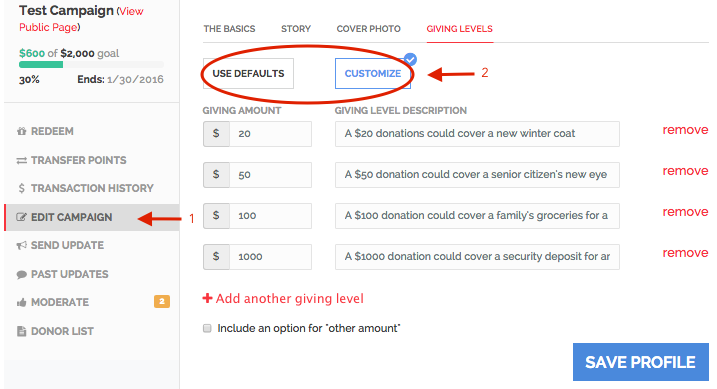
We recommend using a complete sentence in the giving level description that includes the donation amount and its impact. For example, instead of saying “a monthly bus pass” in the description, we would suggest saying, “A $65 dollar donation can provide someone with a monthly bus pass.”
The description is what donors will read and select from, so including a complete sentence will clearly show the impact for each specific amount.
Another way you can use giving levels is for events! If you are planning an event where 100% of ticket sales will go towards a good cause (your campaign), you can set up your campaign’s giving levels as the different price levels for the event. Then, you can download the ‘donor list,’see the names of each donor and what level they purchased, and use this as your guest list.
Comments
0 comments
Please sign in to leave a comment.