
You can change the status of a members profile according to their current situation. When editing a members profile click the "miscellaneous" tab to edit the status.
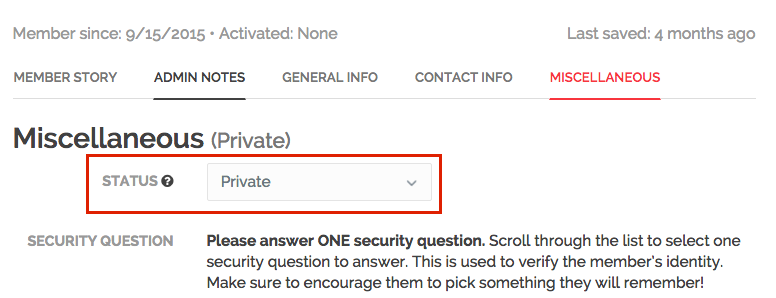
Draft:
Profiles initially have a "Draft" status. This means that you can edit and change the profile, but it is not visible on the HandUp website. Once you have completed the profile, you'll need to change the status to "Active" if you want it to be visible on the HandUp website.
Active:
Active profiles are publicly visible on the HandUp website. Anyone who comes to the HandUp website can browse and find the profile. The content on active profiles can be changed at any time. Click "Edit Profile" from the member's admin dashboard to change the contents of the profile.
Success:
Success profiles are meant for members who have finished fundraising on HandUp. Success profiles are publicly visible on the HandUp website as a "success" and cannot receive new donations. Any donors with a recurring donation to a member whose profile is marked as "Success" will receive an email notifying them that the member has completed fundraising on HandUp. Their recurring donation will be redirected to a HandUp general fund. Profiles with a “success” status can be updated if the member wants to resume fundraising. Just update the member’s fundraising settings by clicking on “Fundraise.”
Deactivated:
If a member no longer wishes to use HandUp, moves and is no longer part of your program, or for some other reason will no longer be participating in HandUp, their profile can be deactivated. Deactivated profiles are no longer visible on the HandUp website and CANNOT be viewed from the member's profile link. Funds remaining in deactivated members' profiles are transferred to a general fund where they can be used for current members.
Unlisted:
Unlisted profiles are not searchable on HandUp website or not search engines but the link is shareable with family and friends or whoever members selects to share their profile with.
These work for members who DO NOT want to have their information public to the world, but want to fundraise ONLY via friends, family, and community. The only people who can see this member's profile will be the people who explicitly are given the link to the member's profile. We'd suggest using this profile status judiciously, as it might be less successful than profiles that are visible on the website.
Private:
Private profiles are not listed anywhere (not on the website nor from any link) but can accept points transferred from general funds and you can make deductions from this profile.
If a participant of your program has a one time immediate need that you want to support using general funds, but a profile is not appropriate, consider using this profile status.
Comments
0 comments
Please sign in to leave a comment.