
Sharing HandUp profiles just got better
We are excited to announce that we have finally created a way for donors to donate to a specific member directly through a simple button on your website, online article, blog post or almost anywhere that is html-friendly.
This embeddable widget comes in 3 different sizes to fit the needs of any website, blog post, news article.
The Tall Widget: features the members photo on top, with their name, goal and needs outlined below followed by the donate button. This is great for side bars or thinner columns.
The Wide Widget: features the members photo on the left, with their name, goal, needs, and donate button to the right. This is great for a full page article or anywhere where you have a wider canvas.
The Mini Widget: This little guy allows for a more compact inclusion, featuring only the member photo, goal progress bar and donate button. This mini widget likes to cut to the chase, it’s great for when space is limited.
For all of these widgets, you can click on the members name and will be directed to the members profile so you can read more about the member.
**Note:These buttons above are real working examples, feel free to click them and test them out! (don't worry, you will not be charged unless you put in your credit card info, so feel free to click through.)
How-to get the widget
Step 1: Go to a member page
Below their photo you will see social media share buttons, you will click the small button to the right of these buttons. (see below)
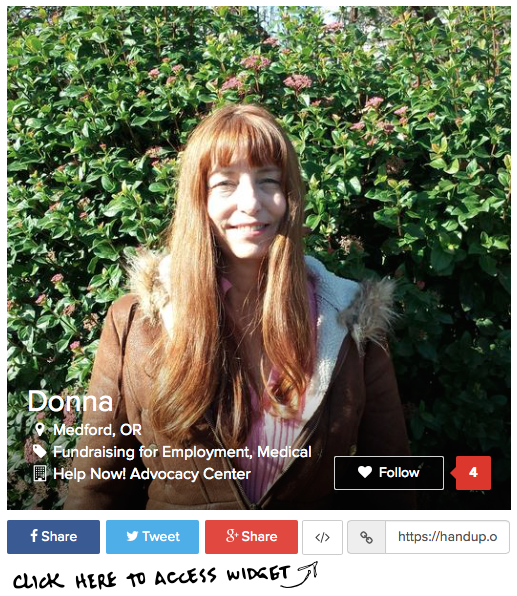
Step 2: Select your prefered size and copy the code provided
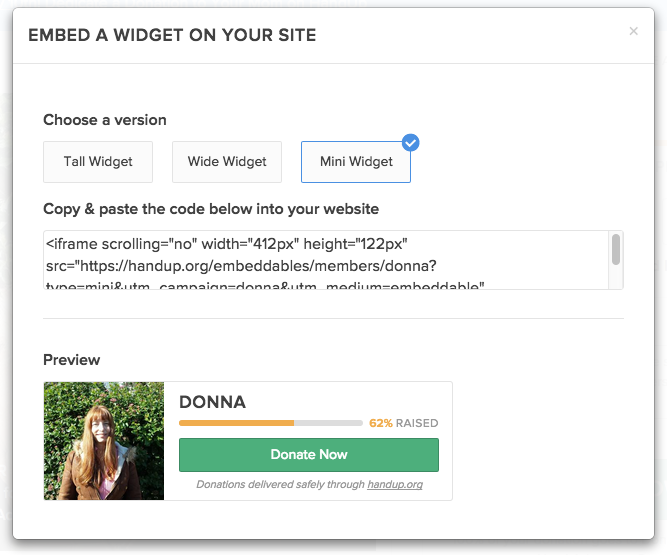
In this example you will see we selected the “Mini Widget” and the code is displayed in the box below. Select the entire code and copy it.
Step 3: Paste it all over the place! Simply paste this code into your website, web article, or pretty much anywhere that accepts html and voila!
Using the widget: for Donors
For the Tall and Wide Widget, once someone clicks the green donate button the user will be presented with suggested donation amounts to choose from (pictured below)
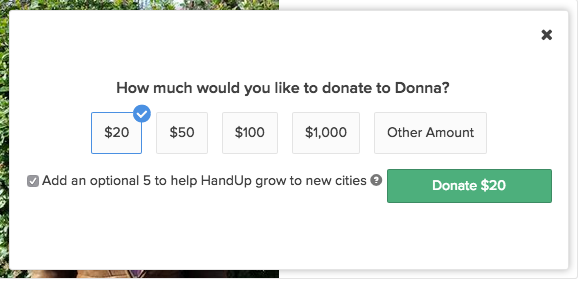
Once they click the green button again, it will direct them to the HandUp page where they can proceed with the transaction.
For the mini widget, the donate button will direct them to the members profile where they can read more about the member and then proceed with donation as usual.
Using the widget: for Partners
There are many ways you can use this widget, here are some recommendations:
On your website - if you include HandUp on your website, this would be a great addition to those pages
In a blog post - if you currently post articles or run a blog, including these buttons is great visibility for your members
In the Press - if local or national news outlets feature one of your HandUp members, they can put this button in their online article to help your member raise funds!
Now that you’ve got the run-down on this new tool - give it a try! We’d love to see it in action so be sure to share a link of where you’ve posted it. You can tweet us @handup, email us at: info@handup.org, or share it on our facebook.
Comments
0 comments
Please sign in to leave a comment.